
Know the exact moment your alert will fire before you save it. With 4CastMachine AI and AI Trading Assistant, setting up and checking your alerts is simple, fast and accurate. Build an alert in a few clicks, or tell or ask AI Trading Assistant by voice or text to create or explain it. This guide shows which candles each condition checks, when an alert fires, and when it can fire again.
Which candles does a condition look at?
Every condition has its own timeframe, in the second box of its row. The condition is measured on candles of that timeframe. For example, RSI on 1h uses hourly candles, even when your chart shows 5m.
Indicators, candlestick patterns, price moves and volume checks use completed candles. Each one is updated when a candle of its timeframe closes. Switching the chart to another timeframe leaves your alert as it is.
A simple price alert works differently. When an alert has a single price condition, such as crosses above 1.09, it watches the live price. It fires the moment price crosses the level. Only Once per bar close makes it wait for the candle to close. This holds while the condition keeps the chart's timeframe. Give it another timeframe, or add more conditions, and it is checked at candle close like the others.
Lines work differently too. A line condition has no timeframe on its row, because price can touch a line at any moment. Its Details (the gear that appears when you move the mouse over the row) show a timeframe only where one is needed:
ATR on appears for touches and approaches when the buffer around the line is measured in ATR. ATR has to be calculated on candles of a timeframe.
Confirm on appears for breaks and bounces off, because both wait for candles to close. It also sets the candles for the ATR buffer.
What is the Confirmation timeframe?
The Options tab has one more setting, Confirmation timeframe. It is the alert's own candle, and it appears only when you need it. You see it with Once per bar, Once per bar close, or a candle closes inside zone condition.
An alert that watches only 4CM-AI forecast conditions has no Confirmation timeframe. Its conditions are 4CM-AI rows without a zone. It fires the moment a new forecast arrives, whichever trigger you choose, also when the market is closed.
The Confirmation timeframe decides three things:
which candle Once per bar and Once per bar close count, so the alert fires at most once in each of those candles,
which candle close Once per bar close waits for when an alert has a 4CM-AI zone condition. The same holds when an alert mixes a 4CM-AI condition with a price, candle or indicator condition. In other alerts, each condition waits for a candle of its own timeframe to close.
which candle has to close inside the zone for a candle closes inside forecast condition.
Each condition keeps its own timeframe. For your first alerts, give the conditions and the Confirmation timeframe the same value. Use different values only when you want a slower or a higher-timeframe check on purpose.
Example: a 15-minute crossing with an hourly filter
The example alert has two conditions on two timeframes:
Condition 1: Price on 15m crosses above 1.09.
Condition 2: RSI 14 on 1h is above 55, joined with and.
On the Options tab: Once per bar close, with Confirmation timeframe set to 15m.
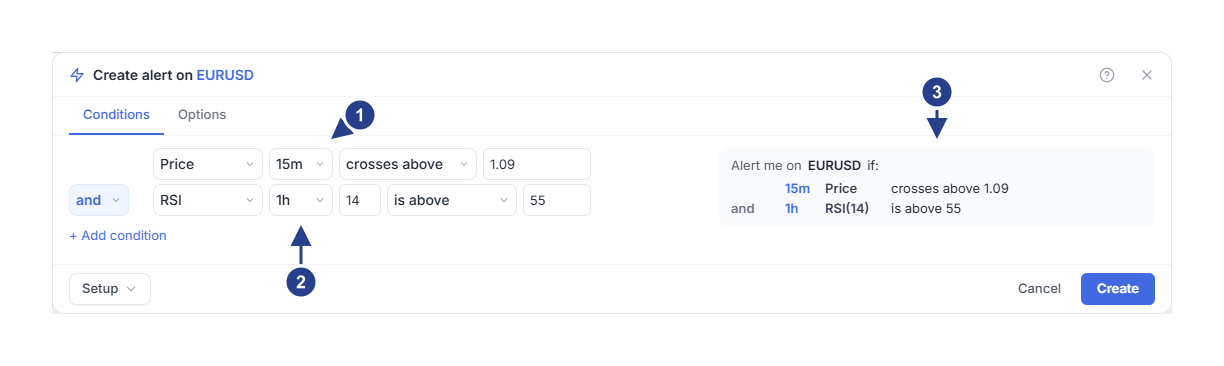
15m: the crossing is checked each time a 15-minute candle closes.
1h: the RSI value is updated each time an hourly candle closes.
The summary shows each condition with its own timeframe, so you can check both before you save.
Each time a 15-minute candle closes, the alert checks whether price crossed 1.09. Then it looks at the latest hourly RSI value. It fires at the first 15-minute close where price crosses 1.09 while that RSI value is above 55.
If the alert does not match what you see on the chart, open it with Edit. Compare each condition's timeframe, the indicator settings and the value with the chart you are looking at.
How often can an alert fire?
The Trigger setting on the Options tab decides this. A bar is one candle.
Once only: the alert fires one time and then stops. Its status changes to Stopped: Triggered. New alerts start on this choice, unless you saved your own defaults.
Once per bar: the alert can fire again, but at most once in each candle of the Confirmation timeframe. With 1h there, it fires at most once an hour, even when a condition uses 1m candles.
Once per bar close: the alert waits for the candle to close, and fires at most once per candle. Choose it when a spike that falls back before the close should not count.
Once per minute: the alert can fire again, with at least one minute between two alerts.
The trigger only decides how often the alert may fire. Indicators, patterns, breaks and bounces off always wait for their candles to close, whatever you choose here.
Why doesn't my alert fire on every candle?
An alert fires when its conditions change from false to true. While they stay true, the alert stays quiet.
Some conditions happen at one moment: crosses above, crosses below, enters, or a candlestick pattern that completes. From a fresh start until the alert fires, a multi-condition alert remembers each moment condition as soon as it happens. Other conditions stay true for a while: is above, is below, and is inside.
Say RSI rises above 50 and stays there for six candles, with the alert set to Once per bar close. That is one change, so you get one alert, not six. Before the alert can fire again, RSI has to fall back to 50 or below and then rise above 50 again.
What happens when I create or resume an alert?
The alert starts from the market as it is at that moment. If a condition is already true when you press Create, the alert waits for the next change.
The same happens when you resume a paused alert. For a crossing, price has to move through the level again. For a line touch, price first has to move away from the line. The next touch then counts.
What else can keep an alert quiet?
Schedule: outside the hours you set, the alert does not fire, and nothing is saved for later.
Expiration: after the end date, the alert stops. Its status reads Stopped: Alert expired.
A muted group: its alerts are skipped until you unmute the group.
Missing data: a condition needs recent prices and enough candle history. For some symbols, volume arrives later than the live price.
Once per bar close: price that visits a level inside a candle but closes back on the other side does not count.
To see what an alert is doing, click the lightning icon (Alerts) in the top toolbar. Each alert shows its status, such as Active or Stopped: Paused. Open the Log tab to see every time an alert fired. Alerts with 4CM-AI forecast conditions follow a few extra rules, explained in the forecast guides below.