
ForecastCity alerts in 4CM-AI Charts watch 4CastMachine AI forecasts, price levels, drawings, indicators and candlestick patterns while you are away. Tell or ask AI Trading Assistant by voice or in writing to build an alert in seconds. You can also set it up yourself in a few clicks.
Start with one condition, or combine several in one alert. For example, wait for a 1h Buy zone visit, a bullish 4h forecast and RSI above 50. The multi-timeframe forecast alert guide shows how these conditions work together.
A forecast shows the most likely price path. An alert tells you when to look.
You create every alert in one window with two tabs. On Conditions you choose what to watch. On Options you choose how often the alert can fire and where it reaches you.
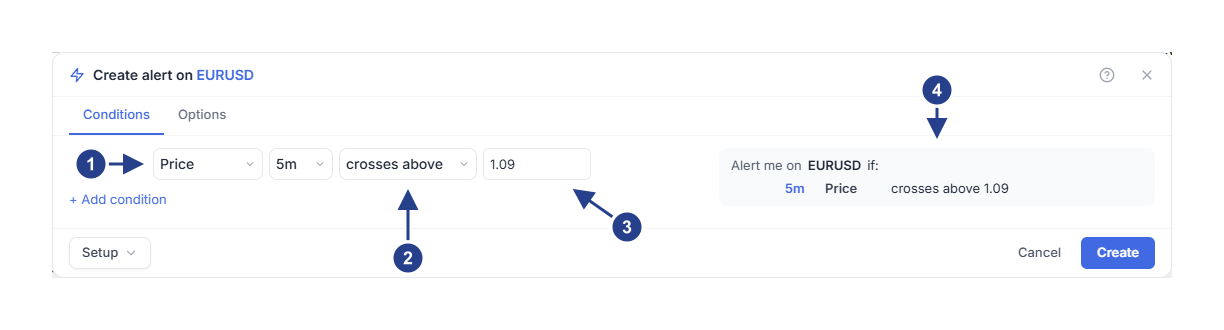
Price: what the alert watches. You can also choose a 4CM-AI forecast, a drawing, an indicator or a candlestick pattern here.
crosses above: what has to happen.
The price level to compare with.
Alert me on EURUSD if: the whole alert in plain words. Read it before you save.
Start here
Quick tour: create and check an alert. Have you used alerts before? This tour shows the whole workflow on one page.
Step-by-step guides: learn alerts by example. Learn in a set order, or find the guide for what you want to watch.
Create your first price alert. New to alerts? Begin with this guide.
4CM-AI forecast conditions
Price, lines and drawings
Indicators, volume and candlestick patterns
Combine conditions and set the timing
Notifications and messages
Organize alerts and fix problems
Good to know
Your subscription plan decides which kinds of alerts you can create and how many you can keep. Active and paused alerts count toward that number. Alerts that stopped after firing or expiring do not.
4CM-AI conditions work on symbols that have a 4CastMachine AI forecast, in the markets your subscription plan includes. If your subscription plan does not include 4CM-AI alerts, choosing 4CM-AI opens an upgrade card.
4CM-AI is greyed out in the first box of a condition only when the symbol itself has no 4CastMachine AI forecast. Rest the mouse on that box to see why.