
Not every alert waits for one price level. You can also get an alert when price moves a set amount over a few candles, or enters a range. The alert measures each move and watches both edges of the range for you. Setting it up is simple, fast and accurate. Build it in a few clicks, or tell or ask AI Trading Assistant by voice or in writing.
Both start with Price in the first box of a condition. An alert on a single price level can fire in the middle of a candle. Moves and ranges are checked only when a candle of the condition's timeframe closes, on closing prices. A spike that is gone by the close does not count, whichever Trigger you choose.
The first example fires when EURUSD closes at least 0.5% higher than three hours earlier. The second fires when EURUSD enters the range from 1.085 to 1.095.
Get an alert when price moves a set amount
Open EURUSD in 4CM-AI Charts. Click the lightning icon (Alerts) in the top toolbar and press +.
In the first box, choose Price. In the second box, choose 1h.
In the third box, choose moves up by. An amount box appears at the end of the line, and a second line appears under it.
Change the amount from 5 to 0.5. On the second line, leave the unit on %.
In the box before bars, change 10 to 3. A bar is one candle. Here, that means three 1h candles.
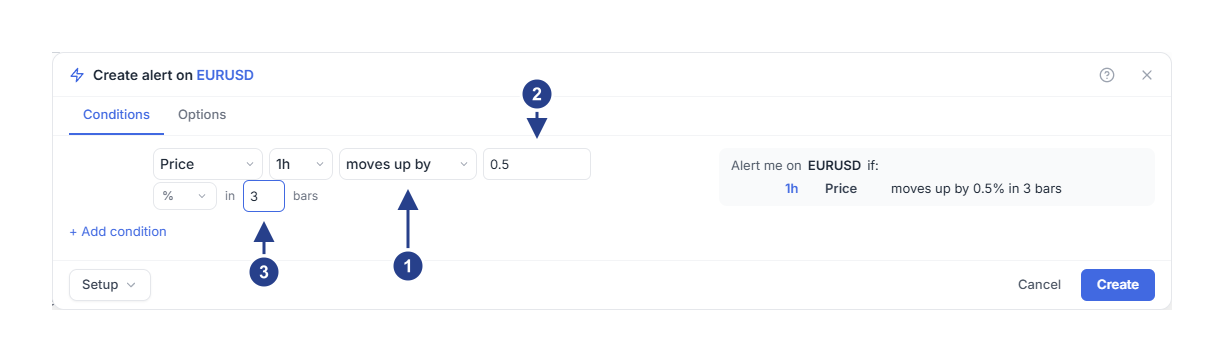
moves up by: price has to rise by at least the amount. moves down by is the same for a fall.
The amount: how far price has to move, here 0.5.
The number of candles: how far back the alert compares, in candles of the condition's timeframe.
The summary on the right now reads 1h Price moves up by 0.5% in 3 bars. Press Create.
Trigger starts on Once only, unless you saved your own defaults. The alert then fires once and stops. To hear about later moves too, open the Options tab and set Trigger to Once per bar close with a 1h Confirmation timeframe.
When does the move alert fire?
The alert compares the close of the candle that just ended with the close three candles earlier. Say a 1h candle closes at 1.0800 at 09:00. Three candles later, at 12:00, a candle closes at 1.0856. That is 0.52% higher. The alert fires at 12:00.
Only closes count. If price jumps to 1.0870 at 11:30 and the 12:00 close is 1.0840, the move is 0.37%. The alert keeps waiting.
The alert fires when the move reaches 0.5%. It does not fire again just because the move stays that large. With Once per bar close, it fires again only after the move drops below 0.5% and then reaches it once more.
Get an alert when price enters a range
Start another alert on EURUSD. Choose Price in the first box and 1h in the second.
In the third box, choose enters. A second line appears with two price boxes, both at 0.
Type 1.085 in the box after between, and 1.095 in the next box.
Check the summary. It reads 1h Price enters 1.085-1.095. Then press Create.
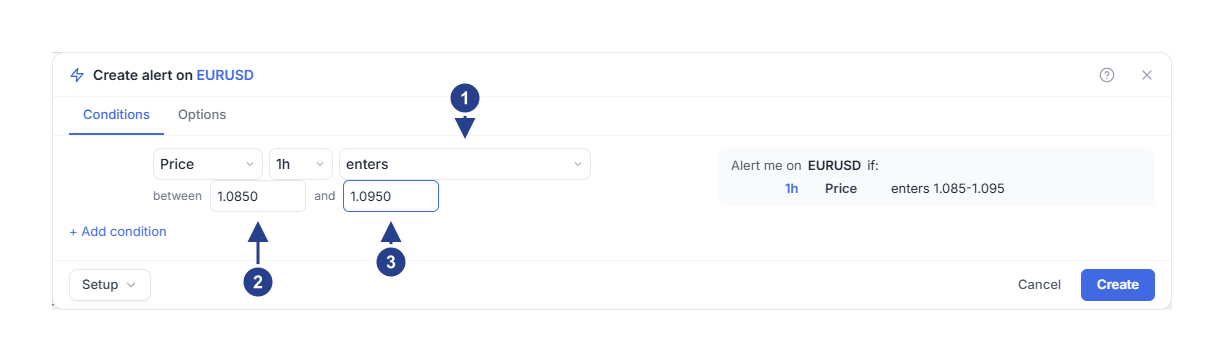
enters: the moment a candle closes inside the range after the candle before it closed outside.
The bottom of the range, in the box after between.
The top of the range.
When does the range alert fire?
Say EURUSD trades above the range:
At 14:00 a 1h candle closes at 1.0962, above the range.
At 15:00 a candle dips to 1.0938 and closes at 1.0955. The close is still outside the range. Nothing happens.
At 16:00 a candle closes at 1.0941, inside the range. The alert fires at 16:00.
exits is the opposite moment: a close moves from inside the range to outside it. The choices is inside and is outside stay true while candles close inside or outside the range. Both work best next to another condition, as a filter.
The range stays where you typed it. It does not follow Bollinger Bands or a 4CM-AI Buy zone or Sell zone. For those zones, see Get an alert when price reaches a forecast zone.
Good to know
Choose pts as the unit to measure the move in price instead of percent. On EURUSD, an amount of 0.0050 is then 50 pips. The summary calls this unit "price units".
The amount must be more than 0, and the first price of a range must be lower than the second.
Use at most 299 candles. The box accepts up to 500, but the alert keeps only the last 300 candles. A longer look-back never fires.
A move that is already 0.5% when you press Create does not fire. It first has to shrink below 0.5% and then reach it again.
If the alert does not fire
Look at closing prices on the condition's timeframe, not at wicks. Switch the chart to that timeframe to see the same candles.
Open the alert with Edit and check the amount, the unit, the number of candles, the two prices and the timeframe.
Check that the alert is Active and that the time is inside its Schedule. Outside those hours it does not fire, and nothing is saved for later.
When the alert fires, the Log tab of the Alerts panel lists it.